
Export Douban.fm Favorites to Any Player
Overview
The software is a browser extension designed for users of Douban.fm who wish to export their favorite songs to other music platforms. It enables the transfer of heart-liked tracks from the Douban.fm interface into usable formats, such as plain text or structured lists, suitable for importing into local music players like NetEase Cloud Music. The tool addresses a key limitation: Douban.fm does not natively support exporting favorite song lists. This makes it particularly useful for users who have accumulated a significant number of liked tracks over time and want to preserve or migrate their music collection.
Target users include music enthusiasts, long-time Douban.fm subscribers, and individuals managing personal music libraries across multiple platforms. The extension operates entirely within the Chrome browser environment, requiring no additional software installation beyond the browser and the extension itself. Real-world usage scenarios include migrating playlists to NetEase Cloud Music, organizing music collections in Excel or text files, and backing up favorite tracks for offline access.
Developed by qiwen, the extension has been maintained since 2011 with regular updates to adapt to changes in Douban.fm’s interface and functionality. The developer has responded to user feedback by adding features such as support for Kugou, Kuwo, and Xunlei-based imports, demonstrating ongoing commitment to usability and compatibility.
Key Features & Capabilities
- Export Favorite Songs from Douban.fm – Automatically retrieves heart-liked tracks from the Douban.fm interface, providing a reliable way to extract a complete list of user favorites.
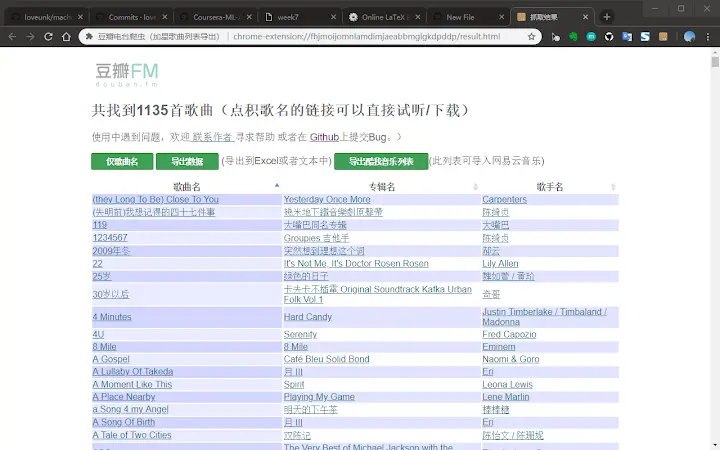
- Support for Multiple Export Formats – Offers plain text output and structured table formats, making it easy to copy and paste into tools like Excel, Notepad, or other spreadsheet applications.
- Compatibility with Third-Party Music Platforms – Includes support for generating lists compatible with NetEase Cloud Music, Kuwo Music, and Kugou Music, allowing seamless playlist migration.
- Updated for Interface Changes – Regularly updated to adapt to changes in Douban.fm’s HTML structure and layout, ensuring continued functionality despite platform updates.
- Enhanced Output Options – Added features such as a dedicated plain text export button to improve compatibility with spreadsheet software and resolve display issues.
- Garbage Track Export – Allows users to export songs from the trash bin, providing a way to recover or review previously removed tracks.
These capabilities help users preserve their music preferences, avoid data loss, and maintain continuity across platforms. For example, a user with thousands of liked tracks can generate a full list in minutes and import it into a new music service without manual entry. The extension’s ability to handle large datasets and adapt to platform changes enhances its long-term value.
User Interface, Workflow & Performance
The extension features a minimalistic interface that appears as a small pop-up window when the user clicks the Chrome extension icon. The UI is straightforward, with a single action button to initiate the export process. Navigation is intuitive, requiring no setup or configuration beyond browser installation and login to Douban.fm.
The workflow is designed for simplicity: users log in to Douban.fm, activate the extension, and click the export button. The system then processes the liked songs, with processing time depending on the number of tracks. For users with extensive collections, the process may take several minutes. The developer did not specify resource usage details, but performance is generally stable during execution.
Stability appears consistent across updates, with the developer addressing bugs related to HTML layout changes and login state detection. No performance benchmarks or system load data were provided, but the extension operates within the browser’s sandbox environment, minimizing impact on system resources. Users are advised to avoid interruptions during export to ensure complete data retrieval.
Compatibility & System Requirements
The extension is compatible with Windows, Mac, and Linux operating systems, as it runs within the Chrome browser environment. It requires Chrome version 20 or higher, though specific version requirements were not listed in the provided data. The installation size is 1.2 MB, which is minimal for a browser extension.
Exact system requirements were not listed. However, since it operates as a browser plugin, it relies on the host browser’s capabilities and the user’s internet connection for data retrieval from Douban.fm. No additional hardware or software dependencies are required beyond a modern web browser and a valid Douban.fm account.
Platform compatibility information is limited to the supported OS types and browser environment. No information was provided about memory usage, CPU impact, or supported screen resolutions.
Pros and Cons
Pros
- Efficiently exports favorite songs from Douban.fm to usable formats
- Supports multiple music platforms, including NetEase Cloud Music
- Regularly updated to adapt to Douban.fm interface changes
- Minimal installation size and low system footprint
- Includes useful features like garbage track export and plain text output
- Free to use with no hidden costs
Cons
- Requires manual copy-paste to transfer data to other applications
- Dependent on browser stability and Douban.fm’s public API access
- No built-in import functionality for target music services
- Processing time may be long for large song collections
- Only works within Chrome browser environment
- Does not support offline mode or local storage of exported data
FAQ Section
Is this extension compatible with all versions of Chrome?
The extension is designed for Chrome browsers and has been updated to support manifest version 2. Compatibility with specific Chrome versions is not detailed, but it functions on current and recent stable releases.
Can I use this tool without logging into Douban.fm?
No, the extension requires a logged-in session on Douban.fm to access the user’s heart-liked songs. Users should ensure they are logged in via douban.fm before initiating the export process.
Is the extension safe to use?
Yes, the extension operates within the browser’s security sandbox and does not collect or transmit user data. It only accesses publicly available information from the Douban.fm interface during the export process.
How often is the extension updated?
The developer has maintained the extension since 2011, with regular updates to address interface changes and user-reported issues. Recent updates were released in 2019, indicating ongoing support.
Can I export my playlist directly to NetEase Cloud Music?
The extension generates a list compatible with NetEase Cloud Music, but it does not perform direct import. Users must manually copy the exported content and import it into the target platform.
Final Thoughts & CTA
This browser extension provides a practical and reliable solution for users seeking to export their Douban.fm favorites to other music platforms. Its long-standing development history, adaptability to interface changes, and support for multiple export formats make it a valuable tool for music collectors. While it requires manual handling for final import, its free access, minimal footprint, and consistent performance justify its use.
It is particularly beneficial for long-time Douban.fm users who want to preserve or migrate their music preferences. The extension fills a critical gap in functionality and remains relevant despite platform updates.
Download Export Douban.fm Favorites to Any Player now







